The itch
I grew up skiing in Colorado and spent the years after college in Park City. Now I live in New York, and skiing takes planning. Hunter is the easy one, a couple of hours up the Thruway. Anything better means checking which mountain actually got snow, then flights, then hotels, then a car, each in its own tab with the dates typed in again.
I also paid for an Epic Pass, so I want to use it somewhere better than the closest hill. And if I'm honest, I talk myself out of most quick trips. By the time I've opened six tabs, the weekend feels like a chore. So the real goal was to make it easier to say yes: see where it's snowing, click once, and be halfway to booked.
What it does
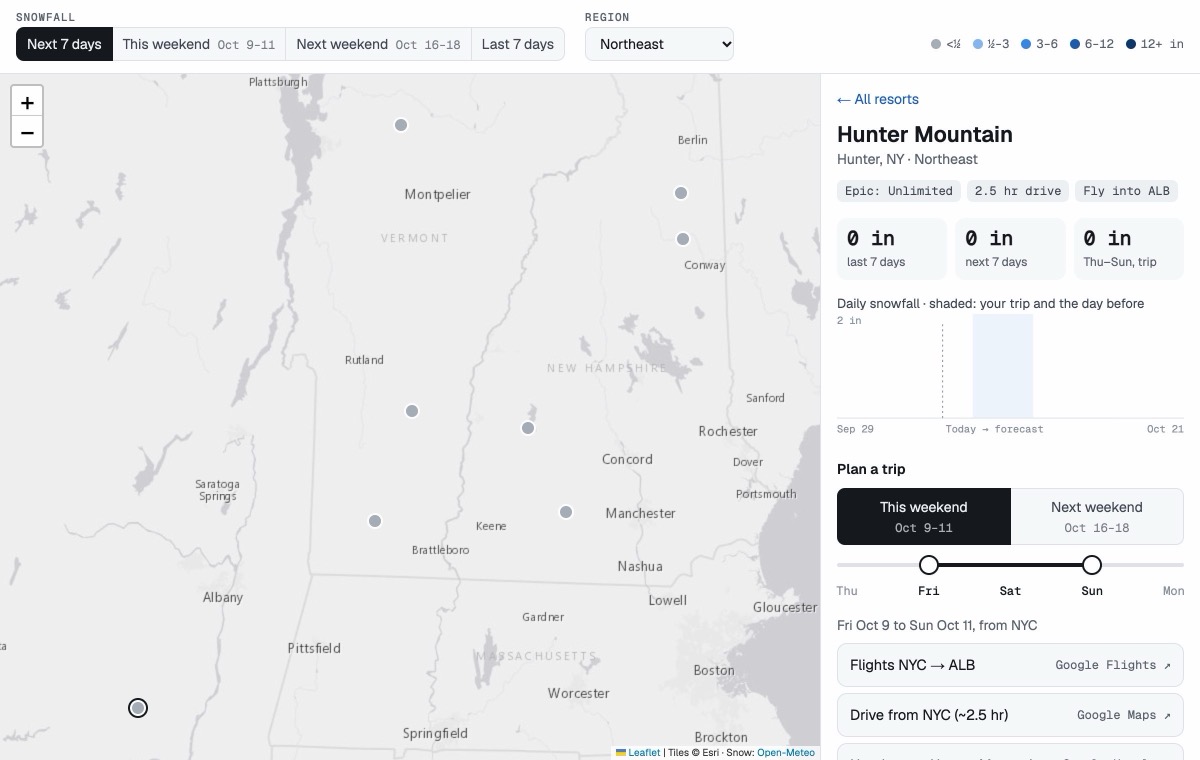
Every Epic Pass resort is a pin on the map, colored by how much it has snowed or is forecast to snow. Pick one and you get its numbers and one link for each part of the trip.
- Snow for the last 7 days, the next 7, or the weekend you're looking at, with a daily chart.
- Trips for this weekend or next, from Sat–Sun up to Thu–Sun or Fri–Mon.
- Links to Google Flights, Google Hotels, Google Maps driving directions, and Kayak rental cars, with your dates already filled in.
- Share links, so I can send friends a specific mountain and weekend to start the group chat.
How it works
It's four static files. There's no server and no database. When you open it, your browser asks Open-Meteo for every resort's snowfall in one request: a week back and about two weeks ahead. The trip links are just URLs built from the dates you pick, so the prices you see are always live.